Built specifically to work with NinjaTrader 8
Your discipline, enforced while you trade
Trade Control AI syncs your orders across every account and holds the operating limits you set. No impulses. Everything goes in automatically. Like a guardian fighting for your interests while you keep your head.
Card up front. First charge on day 16. Cancel before then and you pay nothing.
Six things it does that you can check
- 01
Control
Hit your daily limit — loss or profit — and your trades close themselves.
And it stays shut. The latch doesn't release just because the market turns back around.
- 02
Sizing
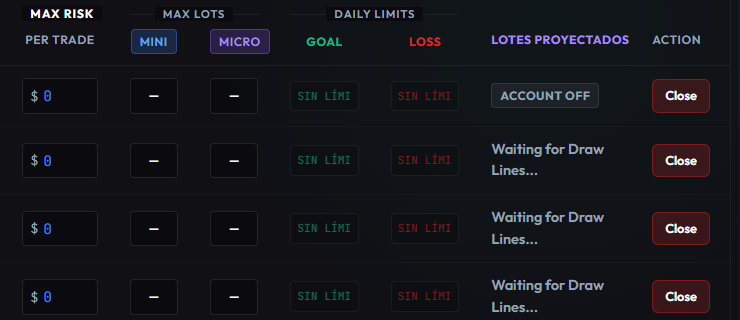
You set the risk in dollars. The system decides the size in lots — NQ or MNQ.
The Protector works out on its own whether to go E-mini or E-micro. And never more than fits the smallest account you have switched on.
- 03
Speed
From your order to every account — and each one keeps its own settings.
Around 15 ms, measured. It never leaves your machine to get there.
- 04
Lot calculator
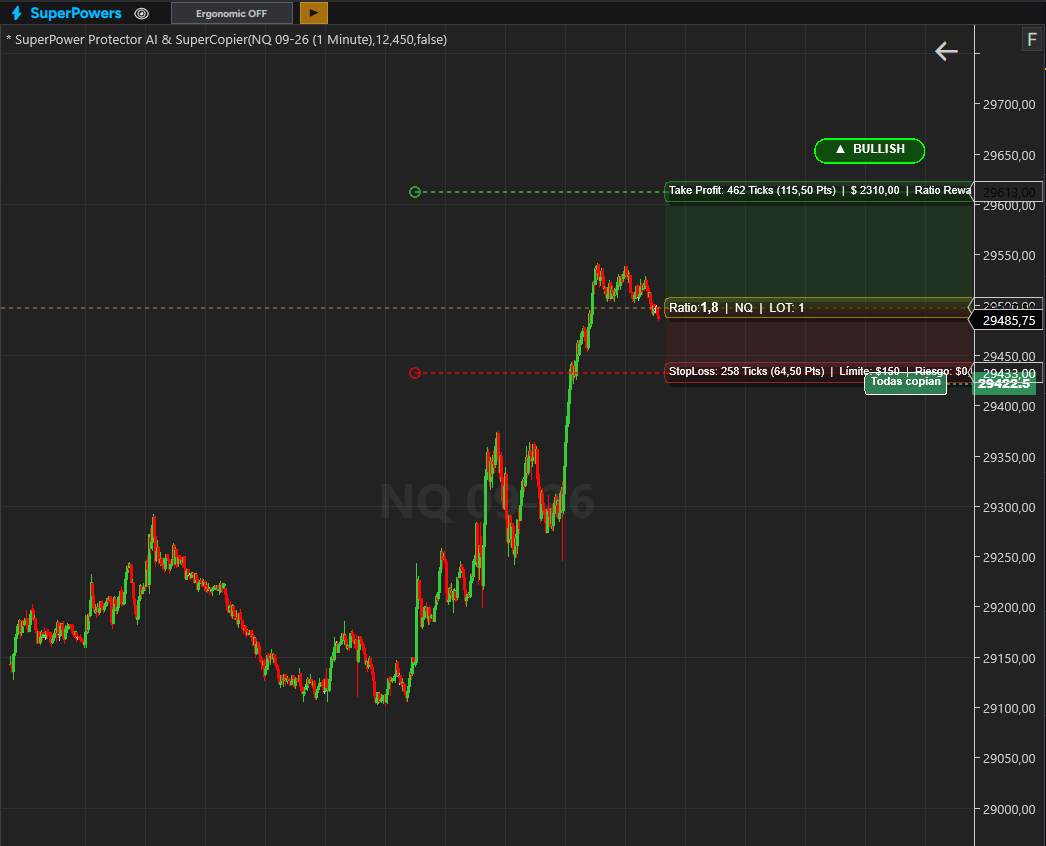
Draw the stop and see the contracts each account gets, before you send anything.
With the dollar risk you set for each one — not the same lot size copied everywhere.
- 05
Peace of mind
It watches your broker connection. You always know where it stands.
Execution happens inside your NinjaTrader: as long as Ninja has a connection, you keep control of your trades.
- 06
Ecosystem
It isn't an indicator. It's an engine, and everything runs on it.
Protector, Journal, Trading Plan, Copier and six SuperPowers on the same piece.
This is what you actually look at
Your chart with the Protector on it, and two pieces of the real panel. Not renderings — these are the screens where you trade.

One engine. Five things on top of it.
Most tools are one indicator on a chart. This is a running engine, and every piece shares what it knows with the rest.
Trade Control AIEngine / Ecosystem
- CopierSpeed
- Your order, replicated across every account you switched on.
- ProtectorControl
- Your daily limits and your stops, held by the machine.
- Trading PlanPeace of mind
- Your pre-market checklist. It gates the entry.
- SuperPowersVersatility
- Six chart tools: order flow, volume, absorption.
- JournalEfficiency
- Every trade recorded on its own, with no typing.
From here to your first replicated order
- 01
Create your account
Email and password. Nothing to install yet.
- 02
Pick your accounts
Turn on the ones you trade today, up to ten.
- 03
Download the package
One file for NinjaTrader 8.
- 04
Set up the Protector
Your limits and your risk, from the web panel.
- 05
Add it to your chart
Drag the indicator on and it connects itself.
- 06
Trade
What you open, every account copies.
Everything included
- Every SuperPower, no add-ons
- 10 accounts at once, live or demo
- Cancel whenever you want
$49.99month
10 accounts
Questions people actually ask
Does it trade for me?
No. You decide when to enter and when to leave. It replicates what you do across your accounts and holds the limits you set. It never opens a position you didn't ask for.
What do I need to run it?
NinjaTrader 8 on Windows, and a browser. The panel runs in the browser and talks to NinjaTrader over a direct cable on your own machine.
What happens to my practice accounts?
They work exactly like a live one, and they take a slot the same way. Your plan covers ten accounts at once — mix them however you want.
What if my internet drops?
The copier runs inside NinjaTrader on your machine, so replication keeps working. What you lose is the web panel, and the panel tells you it lost the connection.
Can I change the number of accounts later?
Yes, whenever you want, from your account page. The price follows the number.
Do I pay anything today?
No. You add your card to start, nothing is charged for 15 days, and the first charge lands on day 16. Cancel before then and you are not charged at all.
Can I cancel?
Yes, whenever you want. There is no permanence clause and no cancellation fee.
Set your rules once. Let them hold.
Card up front. First charge on day 16. Cancel before then and you pay nothing.